Draco · Skyline Blog
What Happens to WhatsApp Business If You Connect a CRM?
Fabián Alvarez7 min read
TL;DR
- With official Meta coexistence, your WhatsApp Business number keeps working the same way on your phone.
- There is no ban risk when the connection uses the official API, unlike unofficial bridges.
- What changes is the operation behind it: a shared inbox with other channels and AI-assisted replies.
- WhatsApp's 24-hour window still applies the same, with or without a CRM connected.
- Draco connects WhatsApp this way, without touching the app your team already uses.
If the CRM uses Meta's official coexistence API, your WhatsApp Business doesn't change on the phone: same number, same app, no ban risk. What does change is the operation behind it: messages land in a shared inbox and can be answered with AI help, always under supervision and respecting WhatsApp's 24-hour window.
The short answer to this question
If you connect your WhatsApp Business to a CRM that uses Meta's official coexistence API, your number keeps working exactly the same way in the phone app. Nobody loses the ability to message you there, you don't lose your history, and there is no ban risk. What changes is not the WhatsApp on the phone: what changes is what happens behind it, in how your team (and an AI) handles those messages.
This matters for an agency because WhatsApp is usually the channel where most inquiries land, and any fear of "breaking" the number slows down the decision to improve your service. It's worth separating two things: what happens to the number, and what happens to the operation.
What exactly is WhatsApp coexistence?
WhatsApp coexistence is Meta's official mode where a WhatsApp Business number works simultaneously in the phone app and in a platform connected via API. It's not an unofficial bridge or a technical trick: it's a mode directly supported by Meta.
In practice, this means:
- The number stays installed on the phone of whoever used it before.
- That person can still see and answer chats from there if they want to.
- At the same time, a platform like a CRM can read and write in those same chats.
- Both accesses coexist without stepping on each other.
This is different from connecting WhatsApp through unofficial methods, which rely on simulating the app and tend to expose the number to bans. With coexistence, the channel stays the same number, the same WhatsApp Business, just with an extra brain behind it.
What actually happens to my WhatsApp if I connect Draco?
Draco, Skyline's AI CRM, connects to WhatsApp through Meta's official coexistence API: the number keeps working in the usual app and there is no ban risk from unofficial bridges.
For an agency, this translates into something very concrete: you don't have to "migrate" your WhatsApp anywhere, you don't have to tell your customers you changed numbers, and you don't depend on a previous phone owner keeping a session open. The number already on your business cards, your Instagram bio and your email signature stays the same.
What does happen is that this number stops being a private chat on a single phone and gets a second front door: the CRM inbox.
Example: an agency in Cartagena
Picture an agency in Cartagena handling tour bookings on a single WhatsApp Business number, run from the phone of whoever handles sales. When that person gets sick or goes on vacation, messages pile up unanswered. Once that same number is connected with coexistence, the phone still works exactly the same for whoever wants to use it there, but now the rest of the team — or an AI — can see and answer the same chats from another screen. The number didn't change. The capacity to handle it did.
So what changes, if the number stays the same?
What changes is the operation around the channel, not the channel itself. Three concrete things:
1. The inbox stops being a single phone
With Draco, WhatsApp comes into a unified inbox for WhatsApp, Instagram, Messenger and TikTok; email also comes in as a channel. That means an agency stops depending on one physical phone to avoid losing sales. Several team members can see the same conversation without forwarding screenshots or wondering "did someone already answer this one?"
2. An AI can start replying, under supervision
Draco runs with a team of five AI agents with distinct roles: Vega, Kai, Axel, Leo and Iris. Vega is the one who handles, pre-qualifies and closes in real time: she recommends from the catalog, quotes, builds packages and carries the sale through to payment. This doesn't replace the number or change how the customer sees it on their phone: for the traveler, it's still a normal WhatsApp chat.
What changes is that this chat can start getting answered automatically, starting in copilot mode (the AI proposes, a person approves or corrects) and moving to autonomous when the team trusts it; it can be reverted at any time. No agency is forced to hand over control overnight.
3. Outside the 24-hour window, Meta's rules still apply the same way
No CRM invents this one: it's a WhatsApp rule for everyone. The 24-hour window is the period after the customer's last message during which a business can reply freely; outside it, a business can only reach out with Meta-approved templates. Connecting a CRM doesn't remove this rule, but it does make it easier to follow: Draco uses Meta-approved WhatsApp templates to reach out first outside the 24-hour window, instead of leaving that follow-up to someone's memory.
What should an agency avoid when connecting WhatsApp to a CRM?
This is where it's worth being direct, because not every method of connecting WhatsApp to an external system is the same.
- Avoid connections that don't go through Meta's official API. So-called unofficial bridges simulate the WhatsApp app from another system, and that can end in a number ban, with all the history and contacts it represents.
- Avoid losing track of who replies to what. If several people and an AI share the same inbox, it's easy for two people to answer the same message or step on each other. That's why it helps to have a system with approve-or-correct buttons before sending, not just an AI firing off messages unsupervised.
- Avoid treating every lead with the same intensity. A customer who already asked for a quote three times doesn't need the same tone as someone who just wrote "hi." Draco lets you configure the intensity of outreach per funnel, with a hard cap of messages per reply, so nobody gets overwhelmed.
- Avoid ignoring the 24-hour window just because a CRM is connected. It still applies; what changes is that there's a tool to manage it with templates instead of losing track.
Official coexistence vs. unofficial connection
| Official coexistence (Meta API) | Unofficial bridge | |
|---|---|---|
| Ban risk for the number | No risk from this cause | Real ban risk |
| Works in the phone app | Yes, in parallel | Usually stops working there or becomes unstable |
| Backed by Meta | Officially supported mode | Not supported by Meta |
| History and contacts | Preserved | At risk if the number gets banned |
This is the kind of table worth checking before connecting any tool to a WhatsApp Business number an agency uses to sell: the difference isn't cosmetic, it's the number itself on the line.
Does this only apply to large agencies with several agents?
No. It applies equally to a one-person agency answering from their own phone and to a team of ten. The difference is how noticeable the problem gets: a solo operator feels the bottleneck when they go on vacation or sleep; a larger team feels it when messages scatter across different phones with nobody seeing the full picture. Coexistence solves the same underlying problem in both cases: the number stays yours and keeps working, while the service behind it gets more organized.
If your agency has already identified WhatsApp as its real sales channel — not just a support channel — this is a good moment to read WhatsApp as a Sales Channel for Agencies: Complete Guide on turning that channel into a sales system, and to see how coexistence fits into a broader WhatsApp strategy.
What to do next
Before connecting any CRM to your WhatsApp Business, ask explicitly whether it uses Meta's official coexistence API or an unofficial method. If the answer isn't clear or sounds evasive, treat it as a warning sign. Start by checking how your number is connected today and decide from there whether you need to take the next step.
More about Draco: draco.skyln.co
Frequently asked questions
Do I need to change my WhatsApp number to connect a CRM?
No. With official Meta coexistence, the number you already use stays the same and keeps working in the phone app. There's no migration and no need to notify customers.
Can I keep using WhatsApp from my phone after connecting the CRM?
Yes. Coexistence lets the number work at the same time in the phone app and in the connected platform, without one option excluding the other.
Does connecting a CRM affect WhatsApp's 24-hour window?
It doesn't remove it or change it, since it's a Meta rule that applies to any business. What a CRM like Draco does make easier is complying with it, using approved templates to re-engage conversations outside that window.
How do I know if a WhatsApp connection is official or not?
Ask directly whether the provider uses Meta's official coexistence API. If the answer is evasive or mentions alternative methods to 'simulate' the app, treat it as a ban risk warning sign.
Does the AI reply on its own from day one?
Not necessarily. Draco can start in copilot mode, where the AI proposes replies and a person approves or corrects them, and move to autonomous mode only once the team trusts that process.
Draco
See Draco in action
The AI CRM for agencies and tour operators: WhatsApp, Instagram, Messenger and TikTok in one inbox, handled by five AI agents.
Try Draco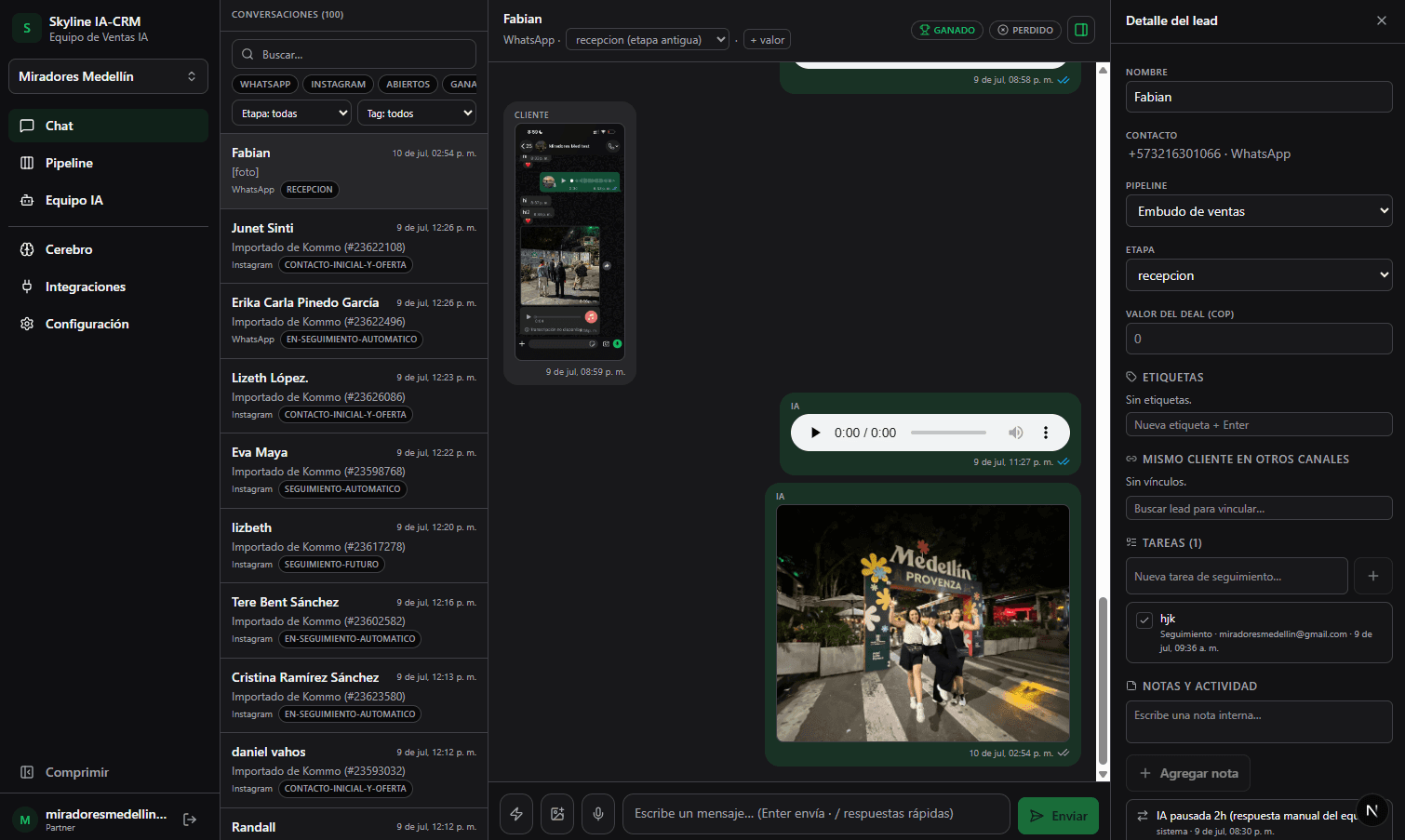
Related · Draco
AI CRM for Inbound Agencies Getting Leads on Instagram
Draco unifies WhatsApp, Instagram, Messenger and TikTok into a single inbox.
ReadWhatsApp Business Coexistence: What It Is and Why It Matters
Coexistence is Meta's official mode that lets the same WhatsApp Business number run on the phone app and on a CRM connected via API at the same time.
ReadHow to Handle TikTok Sales With an AI CRM
TikTok generates comments and DMs at odd hours that no team checks in time.
Read