Luxor · Skyline Blog
Host's Guide: Turn Your Recommendations Into Income
Fabián Alvarez11 min read
TL;DR
- Recommending without a link or QR is free work: there's no record of who originated the booking.
- The ambassador role in Luxor is free and your own page is ready in minutes.
- You earn commission both on experience bookings and on spending at partner venues with a redeemed courtesy.
- You share via digital link or physical QR, and the QR tracks scans.
- The panel shows attributed bookings and commissions per booking and per courtesy in real time.
As a host, you turn your recommendations into income by activating your free Luxor ambassador page, yourname.skyln.co, with verified experiences you order yourself. You share the link or a QR with your guests and earn commission on every booking attributed to your link and on every redeemed courtesy at partner venues, visible in real time on your panel.
Why recommending for free leaves money on the table
If you manage a rental listing, welcome guests at a small inn, or simply know your city well, you're probably already recommending things: the graffiti tour, the viewpoint with the best sunset, the restaurant nobody else knows about. You do it because you want your guest's experience to be good. The problem is that the way you recommend today probably leaves you with nothing.
Think about it this way: every time you tell someone "go to this place" without a link or QR involved, you're generating value for the tour operator or the restaurant, not for yourself. They sell, you earn nothing. It's invisible work you do for free, every day, with every guest who passes through your business.
Luxor, Skyline's ambassador program, exists precisely to close that gap. It turns the recommendation you already make into trackable income: every time a guest books an experience or redeems a courtesy through your link, you earn a commission. It's not extra work. It's the same advice you already give, with a channel behind it that records that you were the one who originated it.
This guide covers the full path: why it's worth it for you, what your page looks like, what to show on it, how to share it, how commissions work and what you see on your panel. It's the complete reference for hosts who want to stop recommending for free.
What exactly is Luxor and how does it work for a host?
Luxor is Skyline's ambassador program: hosts, guides, drivers, creators and agencies earn a commission for recommending verified experiences from their own page. You don't sell anything that doesn't exist. You don't make up prices. You don't have to explain anything complicated to the guest. You simply share a link or a QR that already carries the network's real catalog of verified experiences.
The mechanism underneath is attribution: knowing which partner, link, QR or channel originated a booking or redemption, so the right commission gets paid. That attribution is what separates plain recommending from recommending and getting paid. Without it, there's no way for anyone to know the guest arrived because of you.
A simple example: imagine a host who manages three apartments downtown in a tourist city. Every week they welcome five to ten different guests. Before, they'd recommend tours by word of mouth, with no record at all. With their Luxor page, they now send a link before guests arrive, with the experiences they themselves choose to show. If someone books, the platform knows it came from their link and calculates the commission automatically.
How much does it cost to become an ambassador?
Nothing. The ambassador role is free, and your own link or QR is ready in minutes. There's no subscription to pay, no plan to buy, no fine print that shows up later. You sign up, activate your page, and you can start sharing right away.
This matters because it removes the most common barrier to trying something new: the risk of paying for a tool you're not sure you'll use. There's no such risk here. If you share your link and nobody books, you lost nothing. If someone books, you earn a commission that didn't exist before.
What does your own page as an ambassador look like?
Each ambassador gets a page at yourname.skyln.co with verified experiences from the network, with editable order, highlights and look. It's your personal storefront: a short link, easy to remember and share, showing the catalog of experiences you decide to feature.
The key word here is "editable." It's not a generic page identical for every ambassador. You decide:
- Which experiences appear first. Order matters: what you put at the top is what gets seen most.
- What you highlight. You can spotlight the experiences you know best or the ones that best fit your type of guest.
- How it looks. The appearance of your page is adjustable, so it feels like an extension of your own business rather than a generic catalog.
On top of that, if you already have your own experiences to offer — a homemade tour, an activity you put together yourself — you can add them to your page and sell them alongside the network's. Your page isn't just a showcase for other people's offerings; it can also be the place where you sell your own.
What should you show on your page?
With the whole network available, the temptation is to show everything that exists. That's a mistake. A page with too many options and no criteria doesn't help the guest decide, and a guest who doesn't decide doesn't book.
The logic is the same you'd apply in your own business: if you have five room types, you don't show all five photos at once to an undecided guest, you show the one that fits them best. Experiences work the same way. Think about the profile of the guest you usually welcome and choose, within the catalog, the experiences that fit that profile best.
Some practical criteria for deciding what to feature:
- What you already recommend from memory. If there are experiences you tend to mention without thinking because you know they work, those go first.
- What complements your location. If your business is near a specific landmark, prioritize experiences that start or pass nearby.
- What fits your guest's timeframe. Someone staying one night needs different options than someone staying a week.
- What you already know people like. If a type of experience gets good feedback from your guests, give it more visibility.
You don't need to reorder your page every day. It's enough to check it every once in a while and adjust based on what you see working.
How do you share your link or QR?
This is where your page stops being a passive showcase and becomes an active income tool. You share via link or QR; physical QRs track scans. This gives you two formats, each with its own moment:
The digital link
It's the natural format for anything that happens over text or screen: the welcome message you send a guest before they arrive, the booking confirmation email, a direct message when they ask what to do in the city. The link goes straight to your full page, with your entire curated catalog.
The physical QR
It's the format for anything that happens in person: a sign at reception, a card on the nightstand, a notice by the coffee machine. The advantage of a physical QR is that it tracks scans, so you know how many people looked at it, even if not everyone ends up booking.
A host with a single apartment can rely just on the link, sending it through whatever channel they use to confirm the booking. A host with several properties or a physical reception can combine the digital link with physical QRs in each space: the door, the table, the welcome fridge. There's no single right way; what matters is that the link or QR reaches the guest at the moment they're thinking about what to do during their stay, which is usually right before or right after arrival.
How do commissions on bookings work?
This is the central part: you earn a commission on every booking that comes from your link, and the booking is recorded under your name. It doesn't matter whether the guest books minutes after receiving the link or a few days later; as long as the booking is attributed to your link, the commission is yours.
This removes the ambiguity that existed when you recommended by word of mouth. Before, if a guest booked a tour because you mentioned it, there was no way to prove it or for anyone to credit you for anything. Now, the booking is recorded under your name from the moment it comes from your link, with no manual follow-up needed and no one to ask.
What about commissions on spending, not just tour bookings?
This is one of the lesser-known parts of Luxor, and probably the most relevant for a host who doesn't necessarily operate tours: it also earns on spending at partner restaurants and venues when the traveler redeems a courtesy the ambassador recommended.
This means your recommendation doesn't have to be limited to formal tourism experiences. If you recommend a partner restaurant to your guest and that guest redeems a courtesy — a perk like a drink, an entry or a discount, delivered via QR and redeemed on site — you also earn a commission on that spending.
For a host, this dramatically widens the playing field. You don't depend solely on the guest booking a full tour. It's enough that they use a courtesy at a restaurant, a rooftop or a partner venue you recommended from your page, and that recommendation also generates income for you.
What do you see on your ambassador panel?
Everything above needs transparency for you to trust the system, and that's exactly what the panel solves: a real-time earnings panel with attributed bookings and commissions per booking and per courtesy. You don't have to wait until the end of the month to know if something moved. You log into your panel and see, in real time, which bookings were attributed to your link and how much you're owed for each one, whether from bookings or from redeemed courtesies.
This solves a practical problem every host knows: the uncertainty of not knowing whether what you did generated anything. With the panel, the answer is always available and up to date, without depending on someone notifying you or sending a report.
The three ways to turn recommendations into income, summarized
To have the full picture in one place, here's how the three ways an ambassador earns through Luxor compare:
| Income type | What the guest does | What determines your commission |
|---|---|---|
| Experience booking | Books a tour or activity from your link | The booking is recorded under your name |
| Spending at a partner venue | Redeems a courtesy at a restaurant or partner venue | The redemption of the courtesy you recommended |
| Your own experience | Books something you added yourself to your page | You define how you sell it alongside the network's |
None of these three ways require different work from what you already do as a host. All of them start from the same action: recommending something you'd recommend anyway, but with a link or QR involved.
A concrete case: Valentina Calle, host in Medellín
The real example within the network is Valentina Calle, a host in Medellín, whose page is at valentinacalle.skyln.co. Her case shows the pattern: a host who welcomes guests regularly and uses her own page to channel the recommendations she was going to make anyway, instead of leaving them loose in a conversation or message that leaves no trace.
Her page works just like any other ambassador's: verified catalog, order and highlights she controls herself, and a link she shares with her guests when they arrive or before they arrive.
How to get started: concrete first steps
Step 1: activate your page
Sign up as an ambassador and activate your page at yourname.skyln.co. The process is quick and free.
Step 2: choose what to show
Review the available catalog and decide which experiences go first on your page. Start with what you already recommend from memory to your guests.
Step 3: decide how you're going to share
Decide whether your main format will be the digital link, the physical QR, or both. If you have a physical reception area, a QR in a visible spot is a good starting point. If your contact with the guest is mostly digital, the link in the welcome message is the natural choice.
Step 4: share at the right moment
The moment a guest is most receptive to recommendations is right before or right after they arrive, when they don't have plans set yet. That's the best time to send your link.
Step 5: check your panel
Don't just activate your page and forget about it. Check your panel every once in a while to see which bookings and redemptions were attributed to your link, and adjust what you feature based on what you see working.
What to do now
If you already recommend places and experiences to your guests, the next step is simple: activate your ambassador page on Luxor, choose the experiences you already know well, and start sharing your link with the next guest who arrives.
Frequently asked questions
Do I need to pay anything to become an ambassador on Luxor?
No, the ambassador role is free and your own link or QR is ready in minutes. There's no subscription or upfront payment to activate your page.
Can I earn commission even if I don't operate tours myself?
Yes. Besides earning commission on experience bookings, Luxor also pays commission on spending at partner restaurants and venues when a traveler redeems a courtesy you recommended.
How do I know if a booking happened because of me?
Every booking that comes from your link is recorded under your name, and you can see it along with its commission on your real-time earnings panel.
Can I sell my own experiences on my ambassador page?
Yes, you can add your own experiences to your page and sell them alongside the network's, in addition to what's already verified in the catalog.
What's the difference between sharing via link versus QR?
The link works well for digital messages like a booking confirmation or a welcome message. The physical QR is better for in-person spaces like a reception desk, and it also tracks how many times it gets scanned.
Do I have to constantly update my page for it to work?
It's not required, but it helps to check every once in a while which experiences you're featuring based on what you see in your panel, so you can adjust the order and prioritize what works best for your guests.
Luxor
See Luxor in action
The ambassador program: hosts, guides and creators earn commission for recommending experiences from their own page.
Get started with Luxor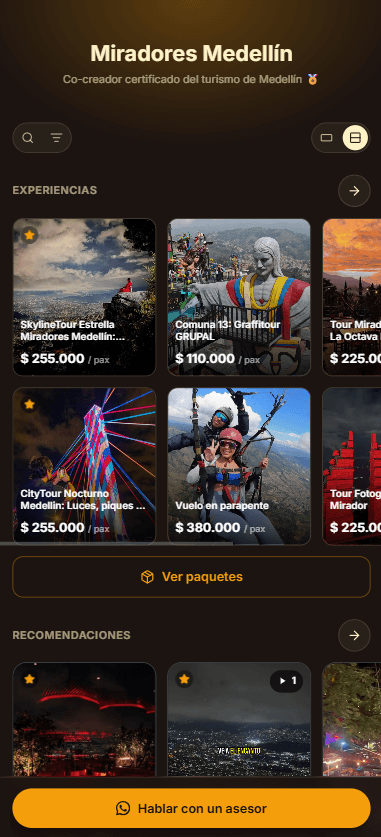
Related · Luxor
What Is a Referred-Spending Commission at Restaurants?
A referred-spending commission is paid when a traveler redeems a courtesy at a partner venue and spends there.
ReadHow to Place a Recommendations QR at a Hotel Front Desk
Generate your QR from your ambassador page and place it at the counter, next to check-in.
ReadGeneric Affiliate Program vs Verified Ambassador Network
A generic affiliate program relies on static materials that go out of date fast.
Read