Luxor · Skyline Blog
How to Place a Recommendations QR at a Hotel Front Desk
Fabián Alvarez7 min read
TL;DR
- Generate your QR from your ambassador page and place it at the counter, next to check-in.
- Physical QRs track scans, so you can tell if the issue is placement or the experiences shown.
- Train front desk staff with one sentence and have them scan the code themselves before recommending it.
- If you have more staff helping, give them sellers with their own URL under your account.
- Check the real-time earnings panel for attributed bookings and commissions per booking and per courtesy.
You generate the QR from your ambassador page in Luxor, print it, and place it at the front desk counter. The QR tracks scans, so you know if it's being used. Train staff with a short sentence, order experiences by typical stay length, and check commissions per booking and per courtesy in the real-time earnings panel.
What you need before printing the QR
A host running a hotel front desk has something valuable they almost never monetize: the exact moment a traveler asks "what should I do today?" That moment can turn into a commission without the receptionist having to sell anything, just show a QR.
That's what Luxor, Skyline's ambassador program, is for. Before printing anything you need three things: your ambassador page already active, a clear idea of which experiences to put first, and a short plan so whoever is at the counter knows what to say when someone asks.
This guide walks you through it step by step: how to generate the QR, how to pick the experiences that go at the top, how to train front desk staff in under ten minutes, and how to check the commissions that piece of paper taped next to the bell is leaving behind.
Example you'll see throughout this guide: a boutique hotel in Poblado with six rooms, one receptionist per shift, and an owner who wants extra income without hiring anyone new.
How the QR is generated and what tracking it has
As an ambassador, you share your page via link or QR, and physical QRs track scans. That means you're not pasting a generic code: every time someone scans it from your hotel's counter, that scan gets recorded and you can see it later in your console.
Step 1: generate the QR from your ambassador console
Log into your ambassador account, find your page at yourname.skyln.co and generate the associated QR code. You don't need outside design work or a separate tool: the QR comes out already linked to your page with the network's experiences.
Step 2: print it at a size that scans quickly
A common mistake is printing the QR too small or on a material that glares under the counter lights. Think of the receptionist at our Poblado hotel: the guest is standing, in a hurry, checking their phone. The QR needs to be readable from half a meter away without anyone leaning into the screen.
Step 3: place it where the conversation already happens
The best spot isn't a poster on the lobby wall that nobody looks at. It's the counter itself, next to the room key or the check-in form, where a conversation between the guest and whoever is helping them already exists.
Step 4: check the scans, not just the bookings
Since physical QRs track scans, you can tell whether the problem is that nobody scans it (then it's a placement or training issue) or whether people scan it but don't book (then it's about which experiences you're showing). That distinction saves you weeks of guessing.
Which experiences to show first on the page
Your page at yourname.skyln.co comes with verified experiences from the network, and you can edit the order, highlights and look. This matters for a hotel: not every guest is looking for the same thing, but there is a pattern by stay type.
Criteria for ordering your storefront
- Duration that fits the stay: if most of your guests stay two or three nights, prioritize half-day experiences over full-day ones.
- Early or flexible departure times: a guest checking in in the afternoon needs something they can book for the next day without friction.
- Experiences with good turnover: if you already know what guests in your area book most, put those at the top.
- Price variety: keep at least one budget option visible next to a fuller one, so you don't filter by price before the guest even looks.
An example with the Poblado boutique hotel
The owner of the boutique hotel notices guests almost always stay two or three nights and look for something to do on their first free afternoon. He orders his page with a half-day tour at the top, followed by a nighttime experience, and leaves full-day departures further down, for anyone staying a week.
How to train front desk staff in under ten minutes
Here's where many hosts fail: they print the QR, paste it, and expect the receptionist to promote it on their own. It doesn't happen. The person at the counter needs three simple things, not a manual.
Step 1: one sentence, not a speech
Give the receptionist a single sentence to say, for example: "If you want to plan something for today or tomorrow, here are verified experiences, just scan and see prices and availability." They don't need to explain how Luxor works or mention commissions.
Step 2: have the receptionist scan the code themselves first
Before asking them to recommend it, have them scan it on their own phone and browse the page once. Nobody recommends something confidently that they haven't seen.
Step 3: define when to mention it
Mentioning it at check-in is not the same as leaving it as a standalone sign. Suggest concrete moments: when handing over the key, when confirming breakfast hours, or if the guest directly asks what to do in the city.
Step 4: if you have sellers under your account, add them
If besides front desk you have someone else helping attend guests or promoting experiences, you can have sellers with their own URL under your account. This is useful, for example, if the hotel runs different shifts and you want to know which shift generates more bookings, or if a bellhop or concierge also wants to participate with their own link.
Step 5: check in with the team periodically
A formal meeting isn't necessary. A short weekly message like "this week X bookings came from the QR" keeps the team motivated without feeling like they're selling something that isn't their job.
How to see the commissions the QR generates
All the work above is useless if you don't know how much it's generating. That's what the real-time earnings panel is for, with attributed bookings and commissions per booking and per courtesy.
What to look at in the panel
- Bookings attributed to the QR: you can see which ones came specifically from that code, separated from other sources if you use several links.
- Commission per booking: every booking that comes from your link is recorded under your name and generates a commission.
- Commission per courtesy: if the traveler redeems a courtesy you recommended at a partner restaurant or venue, you also earn on that spend.
- Comparison over time: checking the panel weekly or monthly tells you whether the counter QR is improving or whether it needs to move, change its featured experiences, or get reinforced front desk training.
Back to the boutique hotel example
After a month, the hotel owner opens his panel and sees how many bookings came from the front desk QR versus his personal social media link. If the counter QR has a good number of scans but few bookings, he knows the problem isn't the code's placement but the order of experiences on his page, and he adjusts the highlights.
Summary table: from printed QR to commission
| Stage | What you do | What you check |
|---|---|---|
| Generate the QR | Create it from your ambassador console, linked to your page | That the link works and the printed QR looks sharp |
| Place it | Paste it at the counter, next to check-in | Legible size from half a meter away |
| Train | Short sentence, receptionist tries it first | That it's mentioned at the right moment |
| Add sellers | If there's more staff, each with their own URL | Which seller or shift generates more bookings |
| Measure | Check the earnings panel | Scans vs. bookings vs. commission generated |
What to do if the QR isn't generating bookings
Before assuming "the QR doesn't work," split the diagnosis into two questions: is it being scanned? and of those who scan, how many book? The first is answered by the QR's scan tracking; the second depends on the order and variety of experiences on your page, and on whether front desk is mentioning it at the right moment during check-in.
Next step
If you don't have your ambassador page active yet, activate it first: without it there's no QR to generate and no panel to check. Once the page is ready, generate the code, print it, place it at the counter and give the short sentence to whoever is at the desk. Check the earnings panel after a week to know whether the spot and the chosen experiences are working or whether something needs adjusting.
Frequently asked questions
How much does it cost to generate the ambassador QR?
The ambassador role is free and your own link or QR is ready in minutes. You don't pay to generate it or to use it at your front desk.
How do I know if the QR is actually being used?
Physical QRs track scans, so you can see in your console how many people scanned it, separate from how many ended up booking.
Can I give my receptionist access without sharing my full account?
Yes, you can have sellers with their own URL under your account, useful if you want a specific receptionist or shift to have their own link to measure their contribution separately.
How do I see how much I've earned from the counter QR?
In the real-time earnings panel you see bookings attributed to your link and the commissions generated per booking and per redeemed courtesy.
What do I do if nobody scans the QR?
First check the code's placement and size, and confirm front desk is mentioning it at check-in with a simple sentence, not just leaving it as a passive sign.
Luxor
See Luxor in action
The ambassador program: hosts, guides and creators earn commission for recommending experiences from their own page.
Get started with Luxor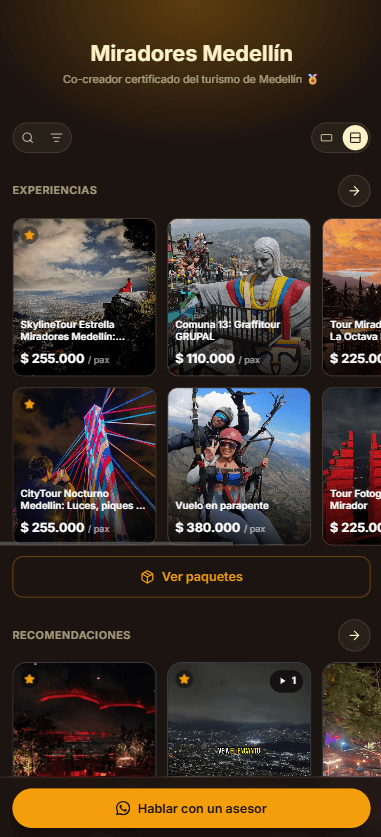
Related · Luxor
Generic Affiliate Program vs Verified Ambassador Network
A generic affiliate program relies on static materials that go out of date fast.
ReadHow a Local Creator Monetizes Her Plan Recommendations
An ambassador page gathers all of a creator's recommendations in one link for her bio.
ReadHow to Add Tour Recommendations to Your Airbnb Check-In
The ambassador link goes in the check-in message, right after logistics and before the closing.
Read