Luxor · Skyline Blog
How to Create a Page to Recommend Tours and Earn Commission
Fabián Alvarez7 min read
TL;DR
- Anyone, including drivers, can register as an ambassador for free with no formal business required.
- Each ambassador gets their own page at yourname.skyln.co with verified experiences from the network.
- You choose, order and highlight which experiences to show based on your passengers.
- Share by link or physical QR, and QRs track scans.
- Every booking made from your page is recorded under your name.
To create your recommendation page, register as a free ambassador with Skyline, get your own page at yourname.skyln.co with verified experiences, choose which to show, order and highlight them, customize the look, and share your link or QR. Every booking from your page is recorded under your name and earns a commission.
Why can a driver earn commission for recommending tours?
If you drive travelers every day, you're already doing the hard part: building trust and being there right when someone asks "what should I do tomorrow?". The only thing missing is a place to send that recommendation and a system that pays you for it. That's Luxor, Skyline's ambassador program: hosts, guides, drivers, creators and agencies earn a commission for recommending verified experiences from their own page.
As a driver, you don't need an office, your own catalog, or to collect cash and track it by hand. You register your page, choose which experiences to show, and share a link or a QR. Every booking that comes from there is recorded under your name and earns you a commission.
How much does it cost to become a Luxor ambassador?
The ambassador role is free; your own link or QR is ready in minutes. There's no monthly fee, no plan to buy, no charge to activate the account. This matters especially for a driver: your extra income doesn't depend on an upfront investment or a long-term commitment. If you don't recommend anything one month, you don't lose money; if you recommend ten experiences, the commission grows with what you actually sold.
Think of a driver who does airport-to-hotel runs in Medellín. Every twenty-to-thirty-minute ride is a perfect window to talk about what to do in the city. Without Luxor, that conversation stays a good impression. With Luxor, it becomes a booking attributed to your page and a commission you can see in your panel.
Step by step: how to create your ambassador page
1. Register as an ambassador
The first step is going to Skyline and choosing the ambassador focus during self-service signup. You don't need business paperwork or your own catalog of experiences: the point of registering is to identify you as a recommender, not an operator. Once you complete signup, your page goes live.
2. Get your own page
Each ambassador gets a page at yourname.skyln.co with verified experiences from the network, with editable order, highlights and look. That address is yours: you can put it on your social profile, on your vehicle, on a card you hand a passenger when they step out of the car. It's not a generic Skyline page; it's your storefront, with your name, showing the experiences you chose to include.
For a driver, this changes the dynamics of a recommendation. Instead of saying "I know someone who runs tours" and losing track of that referral, you send a concrete link. The passenger opens it, sees verified experiences, books, and that booking is recorded under your name.
3. Choose which experiences to show
Your page comes with verified experiences from the network, but you decide which ones appear and in what order. This is where it helps to think like a driver: which passengers do you carry most? If you do a lot of airport transfers, prioritize experiences a traveler who just landed would want to do in their first few days. If you work with groups staying several nights, prioritize experiences that fill a free afternoon or an evening out.
An example: a driver who mostly picks up international travelers at the airport can order their page starting with tours that can be booked on short notice, since those passengers tend to decide their plans on the fly. Another driver who works with boutique hotels and longer stays can highlight full-day experiences, since their passenger has more time to plan ahead.
There's no single formula. The key is that the page feels curated by you, not like a generic catalog anyone would see the same way.
4. Order and highlight
The panel lets you set the order and mark highlights within your page. Use this to put what you know best, or what you get asked about most, first. If a passenger asks "what do you recommend for this afternoon?", your page should answer that without you having to explain anything: the first thing they see is exactly what they need.
Highlights work well for experiences you already have a good track record recommending, the ones where you know the passenger usually ends up happy. Reorder every so often depending on the season: what you recommend during festival season isn't the same as during low season.
5. Customize the look
The look of your page is also editable. It's not just about which experiences you show, but how the page you're about to share actually looks. A page with your face, your name, and an order that makes sense builds more trust than a generic link. A passenger who already trusted you during the ride will trust what you show them once they arrive too.
6. Share by link or QR
Share via link or QR; physical QRs track scans. This gives you two ways to reach the passenger depending on the moment:
- Link: use it for whoever contacts you after the ride, for example if they text you the next day asking about plans.
- Physical QR: use it during the ride itself. You can have it printed in the vehicle, on a card, or on a small visible sign for the passenger to scan while they're with you.
The advantage of a physical QR is that you can see how many times it was scanned, without depending on the person remembering to text you or search for your profile. That gives you a sense of how well that touchpoint is working: if the QR in the car generates scans but few bookings, the page may need adjustments to the order or highlights; if it generates few scans, the problem might be where you placed it.
What happens after you share the link?
Once the passenger opens your page and books, that booking is attributed to your account. You don't have to follow up manually or ask whether they booked: the system records it. From there, your job as a driver can stay exactly the same: drive well, give good information, build trust. Recording the sale and calculating the commission is no longer on you.
Summary table: the steps and what each one gets you
| Step | What you do | What you get |
|---|---|---|
| Register | Sign up as an ambassador in Skyline's onboarding | Activate your account for free |
| Own page | Receive yourname.skyln.co | A storefront with your name |
| Choose experiences | Select what to show from the network | Your page fits your passengers |
| Order and highlight | Set the order and what stands out | The passenger sees what's relevant first |
| Customize the look | Adjust how the page looks | You build more trust when you share it |
| Share | Send the link or place the physical QR | Every booking is recorded under your name |
Common mistakes when starting as a driver ambassador
Showing too many experiences with no order. If your page has everything mixed together with no priority, the passenger gets lost and books nothing. It's better to highlight a few well-chosen options than to show the full catalog with no criteria.
Not placing the QR somewhere visible. A QR sitting in your wallet doesn't generate scans. Put it where the passenger sees it naturally during the ride.
Recommending from memory instead of sending the link. Saying a tour's name without sending the link means the passenger has to search for it themselves, and that's where booking attribution gets lost. Always send your link or your QR.
Not reviewing or adjusting the order over time. What works in high season doesn't always work in low season. Check in every so often on which experiences you're highlighting.
What you need before starting
You don't need prior sales experience or a formal business. You also don't need to invest money to activate your page. The only thing you need is consistency: remembering to send your link or show your QR on every ride where it makes sense, and tweaking your page now and then based on what your passengers ask about most.
What to do now
Go to Skyline's self-service signup, choose the ambassador focus, and activate your page. In the first few days, take a moment to pick three or four experiences you know well and order them before you start sharing the link with your passengers.
Frequently asked questions
Do I need to own an agency to register as an ambassador?
No. The ambassador role is designed for people like drivers, guides or creators who recommend experiences without operating them directly. You simply choose the ambassador focus during signup.
Do I have to pay anything to activate my page?
The ambassador role is free and your link or QR is ready in minutes. There's no monthly fee or upfront investment to start recommending.
How do I know a booking was recorded under my name?
Each ambassador has a panel showing bookings attributed to their link or QR. If a passenger books from your page, that booking is recorded under your account.
Can I change the experiences I show later on?
Yes, the order, highlights and look of your page are editable at any time. You can adjust them by season or based on what your passengers ask about most.
What's the difference between sharing by link and by QR?
The link works well when someone contacts you after the ride, while a physical QR is useful inside the vehicle since the passenger can scan it on the spot. Physical QRs also track scans.
Luxor
See Luxor in action
The ambassador program: hosts, guides and creators earn commission for recommending experiences from their own page.
Get started with Luxor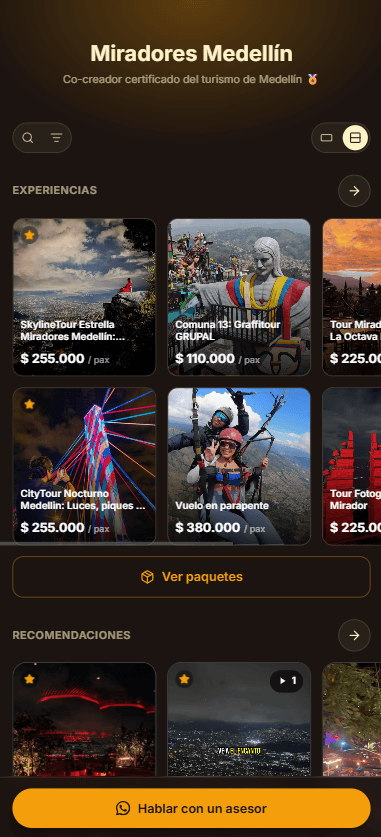
Related · Luxor
Which Experiences to Show Each Type of Guest
Your ambassador page can be reordered and have highlights adjusted based on who's arriving: couple, family, business or group.
ReadWhat Is a Referred-Spending Commission at Restaurants?
A referred-spending commission is paid when a traveler redeems a courtesy at a partner venue and spends there.
ReadHow to Place a Recommendations QR at a Hotel Front Desk
Generate your QR from your ambassador page and place it at the counter, next to check-in.
Read