Luxor · Skyline Blog
How to Add Tour Recommendations to Your Airbnb Check-In
Fabián Alvarez7 min read
TL;DR
- The ambassador link goes in the check-in message, right after logistics and before the closing.
- Each ambassador has their own page with verified experiences they can reorder by guest type.
- The real-time earnings panel shows which bookings came from your link and how much you earned.
- Adjusting the highlight order based on who's arriving works better than rewriting the message.
Put your ambassador page link in Part 2 of the check-in message, right after logistics (code, wifi) and before the closing. Highlight on your page the experiences that fit the type of guest you're hosting, and check the earnings panel to see what they booked and how much you earned.
Why add tour recommendations to your Airbnb check-in message?
The check-in message is the moment your guest pays the most attention to what you send. They already booked, already paid, and they're checking their phone for instructions to get in. If that same message includes two or three verified experiences with your link, you're answering a question the guest will ask anyway ("what should I do here?") while generating extra income that doesn't depend on raising your nightly rate.
With Luxor, Skyline's ambassador program, any Airbnb host gets their own page with verified experiences from the network and earns a commission on every booking that comes from their link. You don't need to build anything: you just need to know where to put the link and what to say around it.
A host with an apartment in Laureles can have their check-in message with recommendations ready in less than an afternoon, without messaging anyone to coordinate commissions or ask for updated catalogs.
What do you need before writing the message?
Before touching the template, confirm you have this:
- An active ambassador page. Each ambassador gets a page at yourname.skyln.co with verified experiences from the network, with editable order, highlights and look. If you don't have one yet, signup is self-service and the link is ready in minutes.
- Your page organized by guest type. Don't leave the full catalog unsorted. Highlight at the top the experiences that fit most of your guests and push niche ones further down.
- A short link to your page to paste into the check-in message without it looking like an unreadable block of text.
With those three points covered, you're ready to build the template.
Where exactly does the ambassador link go in the message?
The most common mistake is putting the link at the end of the message, after the wifi instructions and door code. Nobody reads it there. A check-in message has three natural parts, and the link goes in the second one, not the third:
Part 1: Welcome and basic logistics
This is where check-in time, access code, wifi and contact number go. It's operational information, no decoration.
Part 2: Recommendations with the link
Right after the logistics are handled, while the guest still has the message open, comes the recommendations block with your page link. This is the point of highest real attention: the boring part is over and they're already thinking about what they'll do.
Part 3: Closing and availability
A short close offering help if they need anything else. Don't repeat the link here; they already saw it in Part 2.
Putting the link in the middle of the message, not at the end, is the difference between it getting opened or not.
Check-in message template with recommendations
Here's a structure you can copy and adapt to your own tone:
Hi [name]! Welcome to [apartment name].
Check-in is from [time]. The door code is [code] and the wifi is [network] / [password].
Before you head out to explore the city, here are a few experiences that guests staying here usually enjoy: [link to your yourname.skyln.co page]. You can book directly there, and these are verified experiences, not whatever gets offered to you on the street.
Anything you need during your stay, just message me here. Enjoy your trip!
Notice how the link isn't presented as an ad but as genuine help: "here are a few experiences that guests staying here usually enjoy" reads as a host's recommendation, not a sales pitch.
What experiences should you highlight based on the type of guest?
Not every guest is looking for the same thing, and your page lets you edit the order and highlights depending on who you're writing to. This is key: the message can stay the same, but the order of what you highlight on your page changes based on who's arriving.
| Guest type | What they usually look for | What to highlight on your page |
|---|---|---|
| Couple on a short getaway | Views, food, something romantic | Viewpoints, dinners with a view, sunset tours |
| Group of friends | Party, group activity, something active | Party tours, adventure activities, rooftops |
| Family with kids | Safe activities, little walking | Short tours, calm experiences, family-friendly spots |
| Solo traveler / digital nomad | Local culture, meeting people | Free tours, city tours, group activities |
| Business trip with a free day | Little time, high quality | Short private tours, premium experiences |
If Airbnb gives you this information in the booking message (number of guests, trip purpose if shared), adjust your page's order before sending the check-in message. You don't need to create several pages: reordering the highlights is enough, because the verified catalog stays the same.
A host in El Poblado who mostly receives couples can keep sunset tours and dinners with a view at the top, and move party tours further down since they serve that guest type less.
How do I know what my guests booked?
After sending the message, the natural question is whether it worked. That's what the real-time earnings panel is for: it shows the bookings attributed to your link and the commissions on each one. You don't have to ask the guest whether they booked something or wait until the end of the month to find out if the link worked.
This gives you two practical things:
- See which experiences are getting booked the most from your page, so you can adjust the order of highlights with real data instead of just intuition.
- See how much you're generating from every guest who passes through your apartment, without relying on manual calculations or waiting for the operator to tell you.
If after a few weeks the panel shows that almost nobody books the adventure experiences but the food-focused ones are booking well, that's your signal to reorder your page and adjust the message template.
How do I test if the message works before trusting it?
You don't need a complicated experiment. Checking the panel after the first ten or fifteen stays already gives you a sense of whether the link is being used. If you see attributed bookings, the message is working. If you don't see anything, check two things before giving up on it:
- Is the link in Part 2 of the message, after the logistics and not at the end?
- Do the highlighted experiences on your page match the type of guest you're receiving, or did you leave the default order?
Adjusting these two things is usually more effective than rewriting the template text.
An example of what this looks like in practice
Valentina Calle, an Airbnb host in Medellín, has her own ambassador page on Luxor where she recommends verified experiences from the network to guests staying at her place. Her case shows something simple: the ambassador page isn't a separate storefront you have to promote on its own, it's a natural extension of the message you're already sending to every guest who arrives.
What to avoid when writing this message
- Don't turn the message into a full catalog. Two or three well-chosen recommendations work better than ten options that force the guest to choose between too many things.
- Don't repeat the link several times in the same message; one clear mention in the right place is enough.
- Don't promise anything that isn't part of the real experience. The experiences on your page are the network's verified ones, with real information; don't add adjectives you can't back up.
- Don't forget to check the panel. A link nobody checks is a link nobody adjusts or improves.
What to do now
Log into your ambassador account, order your page's highlights based on the guest type you receive most, and paste the link into Part 2 of your check-in message following this guide's template. After the first few stays, open the earnings panel and adjust based on what you see.
Frequently asked questions
Do I need to pay anything to have my ambassador page?
No, the ambassador role is free and your own link or QR is ready in minutes. You only earn a commission when someone books from your link, you pay nothing upfront.
Can I change the highlighted experiences every time a different type of guest arrives?
Yes, your page has editable order, highlights and look, so you can reorder based on the guest type you're receiving that week. You don't need to create separate pages for each profile.
How do I know if someone booked something from my check-in message?
The real-time earnings panel shows the bookings attributed to your link and the corresponding commissions. No need to ask the guest or wait for manual reports.
Can I add my own experiences to my page besides the network's?
Yes, you can add your own experiences to your page and sell them alongside the network's, giving you more flexibility for the type of guest you host.
Does the check-in message need to be different for each type of guest?
No need to rewrite the whole message; it's enough to keep the same template and adjust the order of highlighted experiences on your page depending on who's arriving.
Luxor
See Luxor in action
The ambassador program: hosts, guides and creators earn commission for recommending experiences from their own page.
Get started with Luxor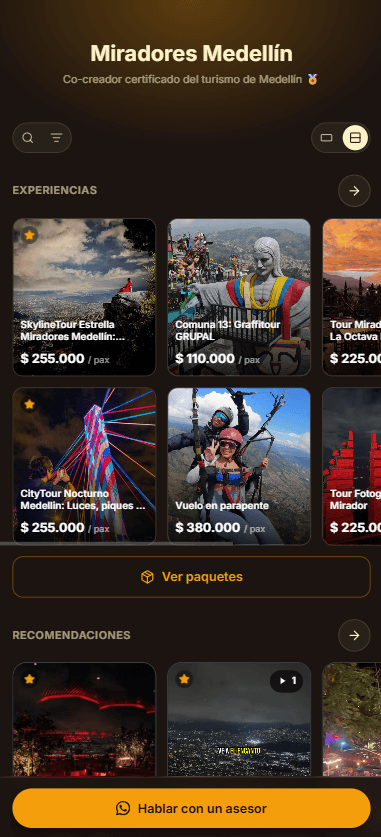
Related · Luxor
How a Rideshare Driver Recommends Tours With a QR
The ambassador QR activates for free and in minutes, at no cost to the driver.
ReadWhat Is a Tourism Ambassador and How They Earn Money
An ambassador recommends network experiences from their own page and earns commission on what they originate.
ReadHow to Create a Page to Recommend Tours and Earn Commission
Anyone, including drivers, can register as an ambassador for free with no formal business required.
Read