Luxor · Skyline Blog
Build a Reseller Agency Page in Luxor with Several Operators
Fabián Alvarez8 min read
TL;DR
- Luxor gives every ambassador their own page with verified experiences from the whole network.
- A reseller agency can add its own experiences and sell them alongside other operators'.
- Page order, highlights and look are fully editable by the ambassador.
- The Meta pixel and traffic report let you measure campaigns and adjust the catalog with real data.
A reseller agency builds its Luxor page by choosing verified experiences from different network operators, adding its own experiences if it has any, ordering the catalog by trip moment and season, and installing its Meta pixel to measure campaigns alongside its page's traffic report.
What does a reseller agency need to build its page in Luxor?
A reseller agency that wants to sell experiences from several operators without operating anything needs three things: access to a verified catalog, its own page to showcase it, and data to know what's working. With Luxor, Skyline's ambassador program, an agency gets all three in a single console, without negotiating contract by contract with each operator.
The ambassador role exists exactly for this: recommending experiences that already exist in the network, without having to operate them, buy them in advance, or chase payments. The agency chooses what to show, in what order and with what look, and earns a commission on every booking that comes from its link.
This guide walks through the full process: from understanding what the page includes by default, to adding your own experiences, ordering a catalog that mixes operators, setting up the Meta pixel to measure campaigns, and reading the traffic report to know what's actually working.
What exactly is an ambassador's page in Luxor?
Each ambassador gets their own page at a URL like yourname.skyln.co, with verified experiences from Skyline's entire partner network. It's not a static landing page: it's a living catalog the agency can edit in order, highlights and look, without depending on every operator keeping their own website up to date.
This solves a typical problem for reseller agencies: previously, selling tours from three or four different operators meant maintaining three or four agreements, three or four ways of getting paid commission, and often broken links or outdated prices. With Luxor, catalog, price and availability verification is handled by the network, and the agency only decides what to show.
Example: an agency in Santa Marta that sells without operating anything
Picture a reseller agency in Santa Marta with no fleet of its own and no guides on payroll, but one that knows its customer well: travelers arriving for a week who want a mix of beach, city and nightlife. That agency can build a page with a whale-watching tour from one operator, a free walking tour from another, and a rooftop dinner from a third, all under its own brand and its own single link.
How do you choose verified experiences from different operators?
The catalog an ambassador sees in their console includes verified experiences from the entire network, not just one operator. Choosing which ones to show on the page is a curation decision, not a negotiation: the agency doesn't need to call every operator for resale permission, because the experience is already available on the shared network.
Steps to select your starting catalog
- Check your audience's category. If your typical customer travels as a couple, prioritize sunset or food experiences over extreme-adventure group tours.
- Filter by what already has good turnover. Experiences with more bookings across the network tend to have better descriptions, photos and adjusted pricing, which makes them easier to convert from your page.
- Mix operators on purpose. Don't fill your page with a single operator's experiences: the advantage of Luxor is offering variety -- a kayak tour, a coffee tasting, a night tour -- without the agency having to operate any of them.
- Leave out what doesn't fit your brand. If your agency positions itself around "relaxed experiences," don't add nightclubs just because they're available.
How do you add your own experiences alongside the network's?
A reseller agency isn't limited to other operators' catalogs. It can add its own experiences to its page and sell them alongside the network's, in the same catalog and with the same purchase experience for the traveler.
This matters for an agency that, over time, starts putting together its own packages or one-off partnerships (for example, a combo with a friendly restaurant) without losing the advantage of also showing the best of the network. The traveler landing on the page doesn't distinguish "this is from the network" from "this is the agency's own": everything looks like part of the same curated catalog.
Typical cases where adding your own experiences makes sense
- An agency that already had a food tour built before joining the network and wants to keep selling it from the same page.
- An agency that negotiates an exclusive package with a boutique hotel and wants to display it alongside the network's tours.
- An agency that combines its own transportation with another operator's experience to build a full day.
How do you order the catalog when several operators are mixed together?
The order, highlights and look of the page are editable by the ambassador. This matters especially when experiences from different operators are mixed together: the order they appear in directly influences what gets booked first.
Practical ordering criteria
- Put seasonal content on top. If you're in whale season or during a specific festival, that experience goes first, regardless of which operator it comes from.
- Group by moment of the trip. Arrival, full day, night, departure: ordering this way helps the traveler plan instead of just "scrolling a list of tours."
- Place your own experiences where they make sense, not only at the top. If your own package is ideal for day two of a trip, put it there, not forced as the first option.
- Revisit the order periodically. What works in high season doesn't necessarily work in low season.
Table: ordering criteria by agency goal
| Agency goal | What to put first | What to push further down |
|---|---|---|
| Sell quickly to travelers with little time | Short, half-day experiences | Full-day or multi-day experiences |
| Increase average ticket | Own packages or combos | Low-value standalone experiences |
| Stand out from other agencies | Exclusive or niche experiences | The most generic catalog items |
| Capitalize on the season | Seasonal content (festivals, weather) | What doesn't apply this season |
How do you set up the Meta pixel and what is it for?
A reseller agency can add its own Meta pixel to its page. This lets the agency measure how well its Facebook and Instagram campaigns pointed at its own URL convert, just as it would with any landing page, but without having to build or maintain that landing page.
Why it matters for a reseller running ads
If the agency invests in Meta ads to drive traffic to its Luxor page, the pixel lets it build retargeting audiences, measure conversions per campaign, and optimize ad spend without depending on manual reports. Before having this option, many reseller agencies ran ads toward a link they couldn't measure with their own tool, and ended up trusting only what the ad platform reported, with no cross-check against real bookings.
General steps to activate it
- Have your pixel ID ready from your Meta ads manager account.
- Add it in your page settings inside the Luxor console.
- Run a small test campaign toward your page to confirm the pixel is registering activity.
- Adjust the campaign based on what you see in your ads manager, cross-checking it with your own page's traffic report.
What does the traffic report show and how do you use it?
Inside the console, the ambassador has a traffic report for their page. This makes it possible to know how many people are coming in, without relying solely on what the ad platform reports or on guesses about what's working.
How to cross-check traffic with results
The traffic report, combined with the real-time earnings panel that shows attributed bookings and commissions for each one, gives the agency a complete view: how many people arrive, and how many of them end up booking. An agency that sees lots of traffic but few bookings has a catalog-order or perceived-price problem, not a visibility problem. An agency with low traffic but good conversion probably needs to invest more in attracting people, not in reordering the page.
Example: adjusting the page with real data
Suppose a reseller agency notices, thanks to the traffic report, that most of its visits come from an Instagram story it shares every weekend, but that those visits aren't turning into bookings according to the earnings panel. The logical fix isn't to stop posting that story, but to check whether the experience featured first on the page matches what's being promoted in that story. If they don't match, the traveler arrives confused and bounces.
What mistakes does a reseller agency make when building its page for the first time?
- Showing too many experiences without hierarchy. A long catalog with no order confuses more than it sells.
- Not checking the pixel after installing it. Installing it and never checking whether it's capturing activity is almost as bad as not having it.
- Ignoring the traffic report. Deciding the catalog order purely by intuition when real data is already available.
- Not mixing own experiences with the network's. Sticking to only one of the two options limits both the catalog and the margin.
How does this connect to turning recommendations into income?
Building the page well is the first step inside a bigger topic: how a host, guide or agency turns their recommendations into recurring income. Host's Guide: Turn Your Recommendations Into Income dives deeper into that full strategy, from the first recommendation to building a steady flow of commissions.
What to do now
Log into your Luxor console, review your page's current order, add at least one of your own experiences if you don't have one yet, and connect your Meta pixel before running your next campaign toward your link.
More about Luxor: luxor.skyln.co
Frequently asked questions
Does a reseller agency have to negotiate with each operator separately?
No. Experiences shown in the Luxor catalog are already verified within the partner network, so the agency chooses what to display without negotiating contract by contract with each operator.
Can you mix your own experiences with other operators' on the same page?
Yes, an agency can add its own experiences and sell them alongside the network's, in the same catalog and under the same page look.
What's the point of adding the Meta pixel if I already run ads on Facebook or Instagram?
The pixel lets you measure conversions and build retargeting audiences directly from your own agency page, instead of relying only on what the ad platform reports.
How do I know if my page's order is working?
Cross-check your page's traffic report with the real-time earnings panel: if there's a lot of traffic but few bookings, the issue is usually the catalog order or the experience you feature first.
Does it cost anything to start using Luxor as a reseller agency?
The ambassador role is free and your own link or QR is ready in minutes, so an agency can try its page with no upfront investment.
Luxor
See Luxor in action
The ambassador program: hosts, guides and creators earn commission for recommending experiences from their own page.
Get started with Luxor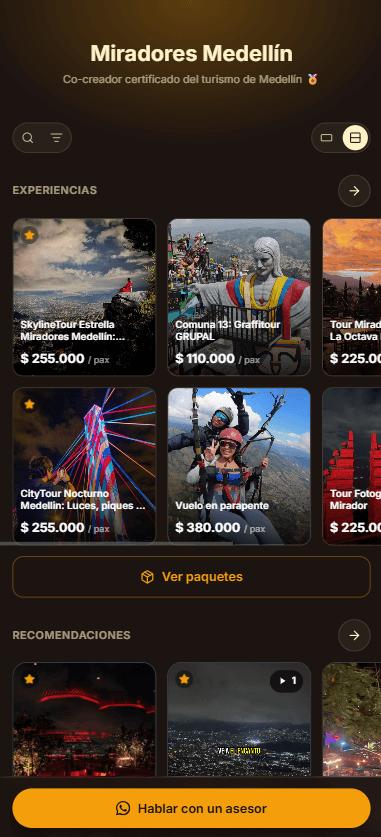
Related · Luxor
How a Boutique Hotel Turns Its Front Desk Into Sellers
Each front-desk person can have their own sales link under the hotel's root account.
ReadWhich Experiences to Show Each Type of Guest
Your ambassador page can be reordered and have highlights adjusted based on who's arriving: couple, family, business or group.
ReadWhat Is a Referred-Spending Commission at Restaurants?
A referred-spending commission is paid when a traveler redeems a courtesy at a partner venue and spends there.
Read