Terra · Skyline Blog
How to Charge Tour Bookings Online: Deposits & Links
Fabián Alvarez10 min read
TL;DR
- A payment link is the base of any charge; in Terra it's born directly from the booking with its own checkout.
- The 30% deposit confirms the slot without asking for full payment, with the balance paid later.
- If the operator doesn't charge online, the booking is confirmed via WhatsApp with the same link.
- Every charge stays visible on a single operations calendar with guides, departures and travelers.
- The per-departure settlement panel brings together online payments, balances and the guide's reports in one cash box.
To charge tour bookings online, use a payment link with its own checkout that can charge 100% or a 30% deposit with the balance paid later. If you don't charge online yet, confirm the booking via WhatsApp with that same link. Terra connects all of this to the operations calendar and each departure's settlement.
What does an operator need to charge tour bookings online?
Charging a tour booking online needs three pieces working together: a payment link the traveler can use without friction, a way to confirm the booking even when it isn't paid instantly, and a record that connects that payment to the real operation (the guide, the departure, the day's cash). Many operators solve the first piece with any generic gateway and then improvise the other two with spreadsheets and WhatsApp screenshots. It works, until the business grows and nobody remembers who paid the deposit, who still owes the balance, and which cash box belongs to which departure.
This guide covers the four ways a real operator charges: full payment, deposit with a pending balance, confirmation without online payment, and how all of that ends up in the operations calendar and in each departure's settlement. The example running through this article is a kayak operator in Guatapé with three guides and daily departures, but the same setup applies to a coffee tour operator in the Eje region, a citytour agency in Cartagena, or a host selling a single-slot experience.
Terra, Skyline's AI booking engine, solves these three pieces as one system: charging, WhatsApp confirmation when it applies, and per-departure settlement in a single place. The rest of the article explains how each mechanism works and when to use it.
What is a payment link and why is it the base of everything?
A payment link is a URL a traveler opens to pay for a booking without installing anything or creating an account. The operator generates it, sends it through whatever channel they use (WhatsApp, email, social media), and the traveler pays from there. It's the minimum indispensable piece: without a reliable payment link, no other charging mechanism (deposit, balance, quickpay) has anything to stand on.
In Terra, online payments work with its own checkout, with a 30% deposit option and balance paid later. This means the operator doesn't need to configure a separate external gateway or send the traveler to a generic form: the link is born directly from the booking, with the correct amount computed from the catalog.
One detail worth underlining: the kayak operator in Guatapé doesn't have to manually decide how much to charge each time. The experience's price is already loaded in the catalog, so the payment link always reflects the real value, with no typos and no discounts someone forgot to remove.
Quickpay: when the booking is born from a single message
There's a frequent case that deserves its own mechanism: a traveler writes in chat, asks about a tour, and wants to pay right now. Rebuilding that booking by hand—opening the system, finding the date, creating the record, generating the link—is slow at exactly the moment the sale is hottest.
That's what quickpay is for: a booking with a payment link from a single chat line. The operator (or whoever is handling the chat) types the bare minimum and Terra returns a payment link ready to send, without going through the full flow of building an itinerary or a package. It's the mechanism built for the exact moment a traveler says "yes, I want to book," when there's no time to lose.
Quickpay doesn't replace the rest of the system: the booking it creates is just as visible in the operations calendar as any other. Only the speed at which it's born changes.
How does the 30% deposit work, and when should you use it?
Charging 100% upfront isn't always the best move for closing a sale. A traveler who's still comparing options may hesitate if the payment commitment is total; a deposit, on the other hand, lowers the decision barrier without the operator losing the assurance that the booking is real.
Terra offers this natively: within online payments with its own checkout, there's a 30% deposit option and balance paid later. The exact number is fixed: 30% deposit. The traveler pays that portion to confirm the slot, and the remaining balance is paid at another point, based on whatever the operator defines for their operation (for example, before departure or on the day of the tour).
When to use a deposit and when to charge in full
There's no universal rule, but some patterns help decide:
- Bookings made well in advance (weeks or months before departure): the deposit lowers decision friction and secures the slot without asking the traveler to commit all the money at once.
- Last-minute bookings (same day or the day before): charging 100% is usually simpler, because there isn't enough time to manage a pending balance.
- Large groups or multi-day packages: the deposit is especially useful here, because the total amount can be high and a partial payment makes closing easier.
- Low-value, high-turnover experiences (a short tour, a transfer): charging in full from the start simplifies accounting, because there's no loose balance to track.
The kayak operator in Guatapé, for example, can use the deposit for groups arriving from Medellín with a week's notice, and charge in full for someone booking via quickpay the same morning as the tour.
What happens to the pending balance
The balance left after the deposit doesn't disappear from view: it stays attached to the same booking and shows up in the operations calendar as part of that departure's information. When it's time to settle the departure, that balance enters the settlement panel's calculation along with every other movement for that date.
What if the operator doesn't use online payments?
Not every operator is ready to charge online from day one. Some are just starting out, others run on cash by choice, and others simply haven't turned on checkout yet. For those cases, Terra doesn't force anyone to use a payment gateway just to operate.
When the operator doesn't use online payments, the booking is confirmed via WhatsApp with the same link. This is key: the link doesn't disappear or change nature depending on whether there's an online payment or not. It's the same booking link; what changes is the confirmation mechanism. Instead of a payment automatically confirming the slot, confirmation arrives via WhatsApp, with the same link the traveler can check.
This has a practical advantage: an operator can start using Terra to organize their booking calendar without first needing to solve the payment gateway question. The water gets tested with the full operation—itineraries, calendar, reminders—and online charging gets turned on when the business is ready.
Example: a citytour agency in Cartagena still charging cash
Picture a small agency in Cartagena that gets bookings through Instagram and charges cash on arrival at the meeting point. It can start using Terra to centralize those bookings in a calendar, generate the link for each booking, and send it over WhatsApp so the traveler has written confirmation, without that meaning online payments have to be activated yet. When it decides to take the leap, the structure is already in place: it just turns on checkout and starts offering the 30% deposit on new bookings.
How does each charge connect to the operations calendar?
An isolated charge isn't worth much if it isn't connected to what happens on tour day: who the guide is, how many travelers are coming, which departure it is. Terra puts bookings, guides, departures, travelers and payments in a single operations calendar, multi-user. This means every payment—full, with a deposit, or confirmed via WhatsApp—shows up in the same place where the operator sees the rest of their operation, not in a separate system.
This solves a common problem: in many businesses, the payment gateway lives on one side and departure planning lives on another (a spreadsheet, a notebook, the owner's memory). When the two are kept apart, it's easy for a paid booking to never get assigned to a guide, or for a guide to receive travelers who actually canceled.
With everything on one multi-user calendar, anyone on the team—the owner, a coordinator, a guide with access—can see the real status of a departure: who paid in full, who left a deposit, who confirmed via WhatsApp without an online payment yet, and how many slots remain.
How do you settle a departure with mixed deposits, balances and confirmations?
This is where the charging system closes the loop. A tour departure rarely has just one type of payment: it's normal for some travelers to have paid in full, others to have left the 30% deposit and paid the balance later, and others to have confirmed via WhatsApp because the operator doesn't charge online on that channel. Adding all of that up by hand, squaring the guide's cash, and calculating commissions is the part of the business that eats the most time and produces the most errors.
Terra has a per-departure settlement panel: each tour's cash, automatic drafts, receipts and AI reading of the guide's report. This means that for each specific departure—not for the business in general, but for that Tuesday 8am tour with that guide—the system builds a draft of how the cash box closed: how much came in through online payments, how much is still pending as a balance, how much was collected in cash if the guide received money directly, and what the guide reports at the end.
What the settlement looks like in practice
For the kayak operator in Guatapé, a departure with twelve travelers might look like this: five paid in full online at booking time, four left the 30% deposit and paid the balance the day before, two confirmed via WhatsApp because they came through a channel where the operator hasn't turned on online payments yet, and one paid cash directly to the guide on tour day. The per-departure settlement panel gathers all of that into that specific tour's cash box, with an automatic draft the operator only has to review and approve, instead of rebuilding the account from scratch.
The AI reading of the guide's report is the piece that closes the loop: if the guide reports at the end of the day how much cash they received, how many travelers showed up, or whether there was any issue, that information enters the same panel without anyone having to transcribe it manually into a spreadsheet.
Summary table: the four charging paths in Terra
| Mechanism | When it's used | What the traveler gets | Where it's recorded |
|---|---|---|---|
| Full payment online | Last-minute or low-value booking | Payment link with its own checkout | Calendar + departure settlement |
| 30% deposit + balance | Advance bookings, groups, packages | Payment link with a 30% deposit option | Calendar (pending balance visible) + settlement |
| Quickpay | Sale born from a chat, immediate close | Payment link generated from a single chat line | Operations calendar, same as any booking |
| WhatsApp confirmation without online payment | Operator hasn't turned on a payment gateway yet | The same link, confirmed via WhatsApp | Operations calendar, no payment attached until resolved |
What happens if a traveler doesn't pay the balance before the date?
Terra doesn't force a single behavior here, because every operator has their own cancellation policies and deadlines. What the system does offer is visibility: the pending balance on a booking with a deposit shows up in the operations calendar, so the operator or their team can see, ahead of time, which bookings still haven't completed payment before departure. That visibility is what lets someone act in time—contact the traveler, adjust the slot, or decide according to the business's policy—instead of discovering the problem on tour day.
What to do next
If your business still charges by manual transfer or rebuilds each tour's cash box in a spreadsheet, the first step is simple: decide for your catalog which experiences are best charged in full and which are better offered with a 30% deposit, and test the full flow with one real departure before rolling it out across your operation. Check how that charge connects to your calendar and to that specific departure's settlement at terra.skyln.co.
Frequently asked questions
Do I have to use online payments to operate with Terra?
No. When the operator doesn't use online payments, the booking is confirmed via WhatsApp with the same link, so you can organize your booking calendar before turning on checkout.
Can I charge 100% instead of the 30% deposit?
Yes, Terra's own checkout lets you charge in full or offer a 30% deposit with the balance paid later; the decision depends on your policy for each experience.
What is quickpay and how is it different from a regular booking?
Quickpay is a booking with a payment link created from a single chat line, built to close a sale fast. The booking it creates is just as visible on the calendar as any other.
Where do I see the pending balance on a booking with a deposit?
On the operations calendar, alongside the rest of that departure's data: guide, travelers and payments, in one multi-user place.
How is a departure's cash box calculated with mixed payments?
The per-departure settlement panel brings together online payments, balances, cash and the guide's report read by AI, and generates an automatic draft the operator reviews and approves.
Terra
See Terra in action
The AI booking engine for tour operators: bookings, itineraries, packages and payments, operated by chat via MCP.
Request a Terra demo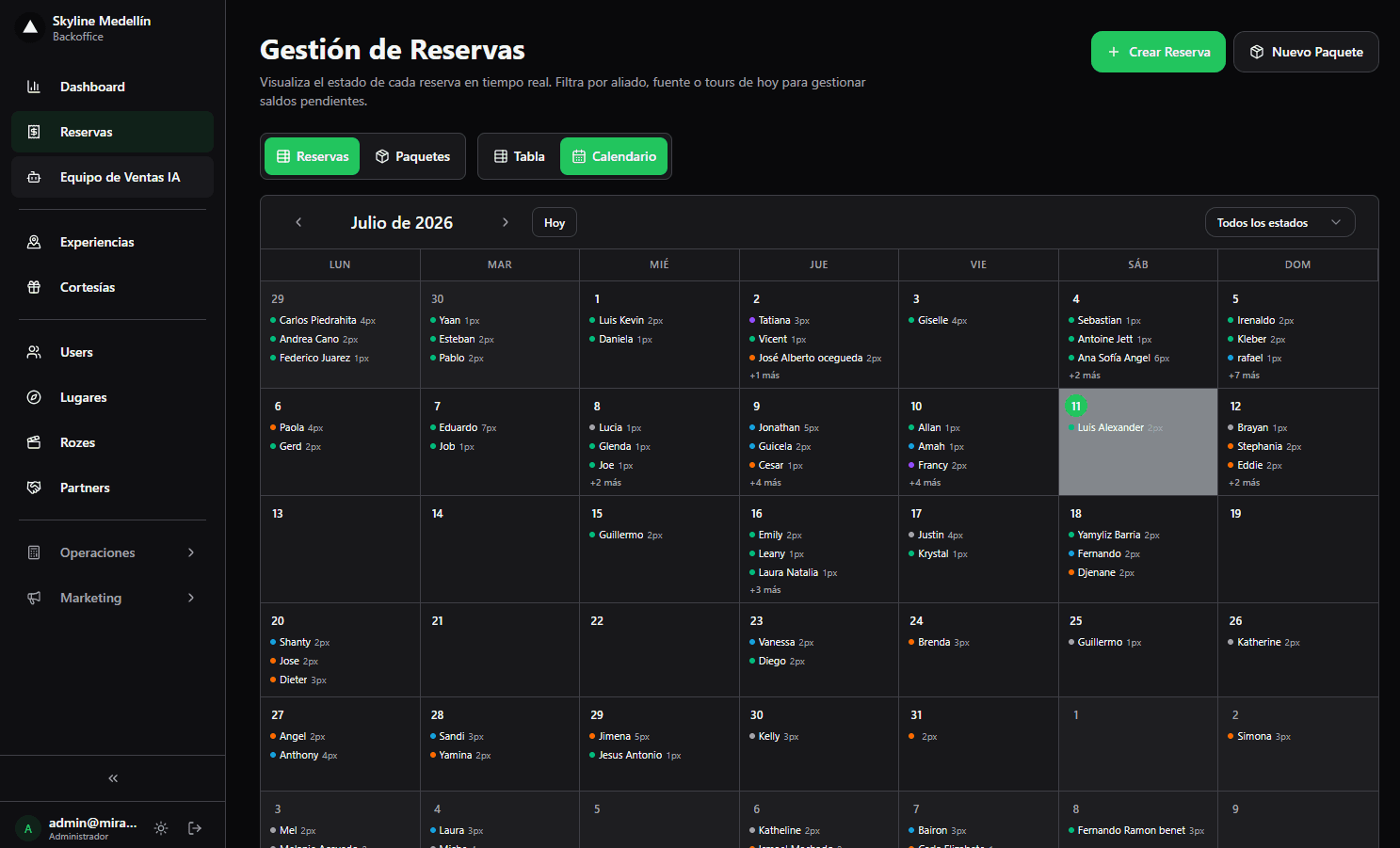
Related · Terra
Booking Software for a Paragliding Company with Limited Seats
Terra organizes bookings, pilots, departures and payments in a single multi-user operations calendar.
ReadPartial Payments and Chat Confirmation: Where Tour Payments Go
Inbound tourism buys in minutes, inside chat, not through web forms built for weeks-ahead planning.
ReadHow to Settle a Tour Departure Without Spreadsheets
Departure settlement is the cash close of a tour: income, guide expenses, commissions and what remains for the operator.
Read