Terra · Skyline Blog
Organize Tour Departures and Guides Without a Spreadsheet
Fabián Alvarez6 min read
TL;DR
- An operations calendar joins bookings, guides, departures, travelers and payments into a single row per departure.
- It's multi-user: the team sees live status without sending files back and forth.
- The settlement panel closes each departure's cash box with an automatic draft from the guide's report.
- You lose a spreadsheet's total freedom, but you gain not having to reconcile data by hand.
You organize departures and guides without a spreadsheet with an operations calendar where bookings, guides, travelers and payments are the same row, not separate files. In Terra, each departure also has a settlement panel with an automatic draft built from the guide's report, so closing the day's cash box doesn't mean recalculating anything by hand.
Why does a spreadsheet fall short for organizing departures and guides?
A spreadsheet works fine while an operator has two or three departures a week and one fixed guide. The problem shows up in high season: several departures the same day, guides rotating, payments arriving through different channels, and someone copying and pasting rows from one tab to another. Every copy is a point where data can get lost: a booking that never got assigned to a guide, a payment that never got marked, a traveler nobody confirmed.
A spreadsheet doesn't know that a booking, a guide and a payment are the same departure. It treats them as separate pieces of data that someone has to reconcile by hand. That manual reconciliation is exactly the work an operations calendar removes.
Picture a horseback tour operator in the Colombian countryside with four guides and up to six daily departures in high season. Today that operator probably has a bookings tab, a payments tab, and a WhatsApp chat where guides get assigned. If a booking changes time, someone has to notify the guide separately, update the tab, and hope the payment status got updated too. With an operations calendar, moving the booking moves everything else with it.
What exactly is an operations calendar?
An operations calendar is the view where bookings, guides, departures, travelers and payments live in the same row, not in separate files. Terra, Skyline's AI booking engine, organizes its calendar this way: each departure shows who booked, how many travelers are going, which guide is assigned and what state the payment is in, all in one place, with several team members viewing it at the same time.
This isn't a prettier spreadsheet. The real difference is that the data isn't copied between tabs: it's the same data seen from different angles. If you change the guide on a departure, that change is automatically visible to whoever checks payments and whoever checks travelers, because there's no second copy of the data to update.
What an operator gains with a calendar like this
- One single source of truth per departure. No more asking "does that booking already have a guide assigned?" in three different chats.
- Real-time team visibility. Several people can look at the same calendar without emailing files back and forth or overwriting each other's edits.
- Less friction when moving things. Changing a date, reassigning a guide or updating a payment doesn't mean touching three files.
- Traceability per departure. Each departure stays together as a complete unit: who went, who guided, how much got paid.
What you lose by dropping the spreadsheet (and why it usually doesn't hurt)
Dropping the spreadsheet means losing the freedom to invent new columns without asking anyone's permission. A spreadsheet is infinitely flexible because it has no rules: you can add a column for "random notes" or duplicate a tab to test something. An operations calendar like Terra's has a defined structure: bookings, guides, departures, travelers, payments. For an operator who already knows their business, that structure isn't a limitation, it's exactly what stops every team member from building their own parallel spreadsheet.
You also lose "I've got it on my laptop" as an excuse. If the calendar is multi-user, nobody holds the definitive version saved locally while everyone else works off an outdated copy.
How do you close the books for each departure without recalculating everything by hand?
Organizing the departure is half the work. The other half is closing it: knowing how much came in, how much the guide spent, what commissions are owed, and what's left for the operator. This is what Terra solves with the per-departure settlement panel.
Each departure has its own cash box: income from that departure, expenses the guide reported, associated receipts, and an automatic settlement draft that the operator reviews instead of building from scratch. The AI reads the guide's report and turns it into numbers ready for review, instead of someone transcribing a WhatsApp voice note or a handwritten expense list by hand.
For an operator like the horseback tour example, this changes how the day closes. Before: four guides send their expenses over WhatsApp at different times, someone enters them into a spreadsheet, someone else calculates what each guide is owed and what's left for the operator, and if there's an error it shows up two days later. With the per-departure settlement panel, each departure already has its cash box built the moment it ends, with a draft ready to approve or correct.
What a spreadsheet and an operations calendar actually compare on
| Spreadsheet | Operations calendar (Terra) | |
|---|---|---|
| Where departure data lives | Spread across several tabs or files | In a single row per departure |
| Who can see the live status | Whoever has the updated file on hand | The whole team, multi-user |
| Closing the departure's cash box | Manual calculation, error-prone | Automatic draft from the guide's report |
| Reassigning a guide | Edit several cells and notify separately | One change reflected across the whole departure |
| History per departure | Depends on someone having saved it properly | Recorded as a single unit |
What does this look like on a real high-season day?
A diving operator on a Colombian Caribbean island has three departures the same Saturday: a certification course and two snorkeling trips. Each one with a different guide, different travelers, and payments that came in at different times (some with a deposit, others paid in full). In a spreadsheet, that's three rows someone has to keep in sync with three WhatsApp chats and an expense notebook.
In an operations calendar, the three departures show up as three blocks on the day's schedule, each with its assigned guide, confirmed travelers, and payment status visible without opening anything else. By the end of the day, each departure already has a settlement draft waiting for review: what came in, what the guide spent on gas and lunch, and what's left for the operator.
This doesn't remove the need to review. The operator still approves or corrects. What changes is that they're no longer starting from zero: they're starting from a draft built from data that was already in the system, not from a manual reconstruction.
Does this replace running operations in a spreadsheet, or just complement it?
The honest question is whether it's worth migrating when the spreadsheet "works." It works until it doesn't: until one departure overlaps with another, until a guide reports an expense nobody logs in time, until someone asks "how much did the weekend bring in?" and the answer takes a day to arrive because three tabs need adding up.
An operations calendar isn't a cosmetic layer over the same problem. It's a structural change: the booking, the guide and the payment stop being three things someone reconciles, and become the same row seen from three angles. You don't get there by adding more columns to a spreadsheet; you get there with a system that understands a departure is a single unit from the start.
If your operation is already overlapping departures in high season and you feel the spreadsheet starting to fail right when you need it most, that's the moment to look at what an operations calendar looks like in practice. This article is part of the content on running tours in high season Run a Tour Company in High Season: Calendar to Settlement, which covers other friction points of this time of year.
What to do now
Open Terra's calendar with a real departure from your next busy week and compare how many manual steps you'd save versus your current spreadsheet.
Frequently asked questions
Does an operations calendar help if I only have one guide?
Yes, though the benefit grows with several guides and overlapping departures. Even with one guide, it stops bookings, payments and travelers from living in separate files that need manual reconciling.
Can I keep using a spreadsheet for other parts of my operation?
Yes, an operations calendar handles the bookings, guides, departures and payments side of each tour. For other internal uses, nothing stops you from still using spreadsheets.
Who reviews the settlement draft for each departure?
The operator. Terra's settlement panel generates an automatic draft from the guide's report, but final approval still belongs to the person running the operation.
Does the calendar work if several team members use it at once?
Yes, Terra's operations calendar is multi-user, so bookings, guides and payments look the same to the whole team regardless of who has the latest file version.
What happens to the guide's expenses if they aren't reported on time?
The settlement panel reads the guide's report whenever it arrives to build the automatic draft; until then, the departure simply stays pending closure instead of getting lost in a chat.
Terra
See Terra in action
The AI booking engine for tour operators: bookings, itineraries, packages and payments, operated by chat via MCP.
Request a Terra demo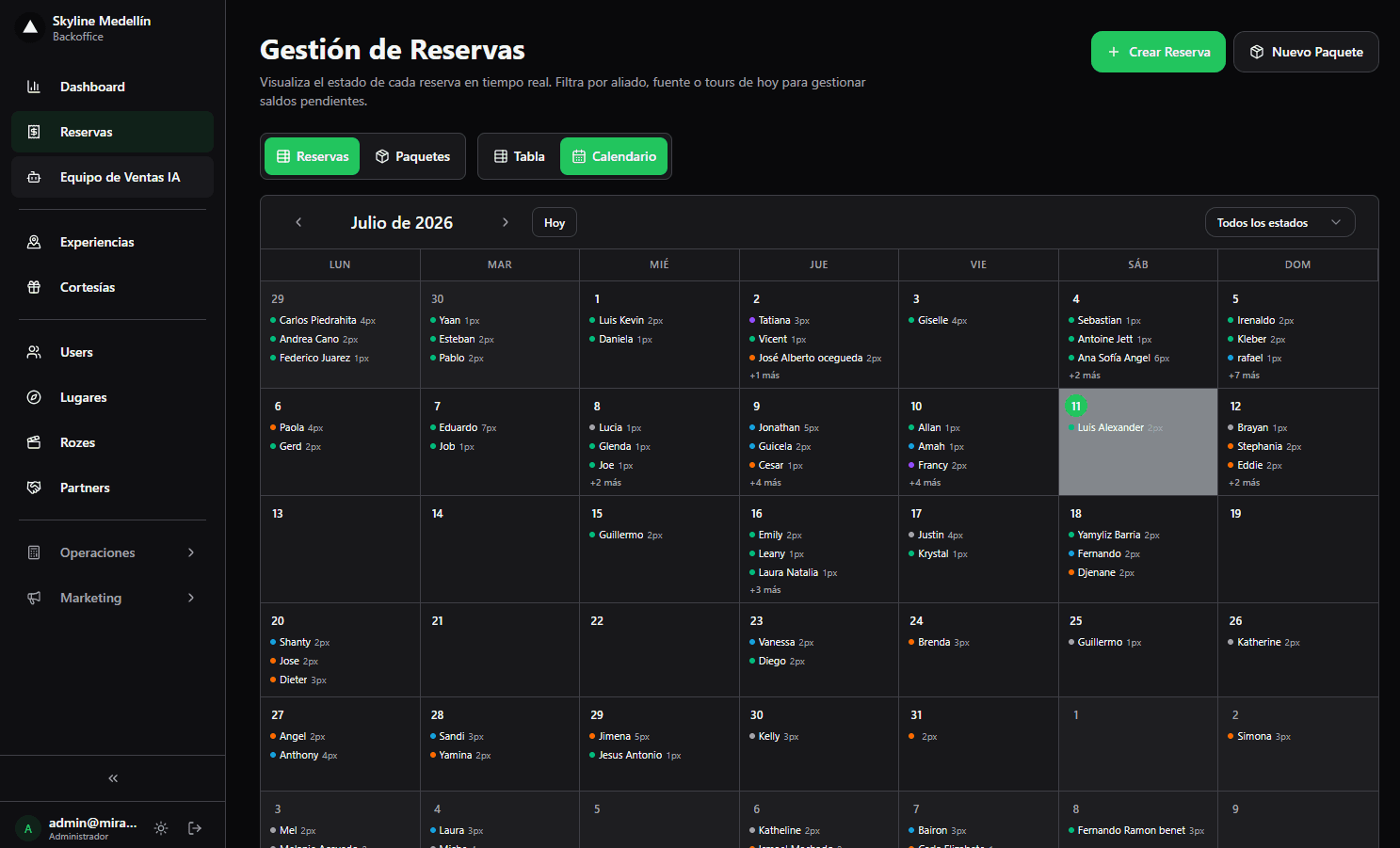
Related · Terra
Run a Tour Company in High Season: Calendar to Settlement
One calendar holds bookings, guides, departures, travelers and payments together.
ReadBooking Software for a Paragliding Company with Limited Seats
Terra organizes bookings, pilots, departures and payments in a single multi-user operations calendar.
ReadPartial Payments and Chat Confirmation: Where Tour Payments Go
Inbound tourism buys in minutes, inside chat, not through web forms built for weeks-ahead planning.
Read